Self-hosted change history for teams that code with agents
Every change leaves a wake. Wakemark keeps it.
Every prompt, agent turn, edit and review behind a commit, kept with it for good: through amend, rebase and squash, and long after the merge. On your own servers.
Try it alone, no server neededRuns inside your network Claude, Codex, Gemini or any ACP agentIn the app or your own editor
-
promptUploads fail about once an hour in staging. Find out why and fix it.
-
agentRead 4 files · ran
cargo test upload, 2 failed -
agentThe gateway drops idle connections after 60 s. A PUT on a dropped connection fails with a reset. Retrying on a fresh connection fixes it.
-
commita41c9e2 upload.rs +18 −3
-
commentMari on upload.rs:42 Why three retries and not a backoff?
-
agentEvery failure in the 09:14 test run was a first-attempt reset, so a backoff adds latency without helping.
-
reviewMari approved a41c9e2
Start alone
Try it on your own first. No server needed.
Install the app, open a git checkout and start a stream. Everything stays on your computer: your agent on your own subscription, every turn with its diff, and the history behind every line.
An agent that remembers.
Each stream keeps its whole context. Undo a turn, or wake the stream months later and carry on.
See what the agent did.
Each turn's diff, file by file, and for any line the commit and the stream it came from.
Keep your pull requests.
Commit and push as usual. Wakemark links the commits and marks the stream landed once main has them.
When your team joins, sign in to a team server. The streams you made alone come along, and you invite reviewers.
The problem
Your agent wrote it. Nobody remembers why.
Agents write more of the code every month. The workflow around them still assumes a human who remembers.
Context dies in a chat tab.
The prompt, the options the agent weighed, the command that failed, the correction: all in one person's window, gone when it closes.
Review sees the diff, not the reasoning.
Reviewers approve output they can't question. For AI-written code, the author often can't explain it either.
Rewrites erase the trail.
Squash and rebase keep history tidy, and cut every link between a commit and the notes behind it.
How it works
One branch, from the first plan to main.
The habits that make agent work hold up, built into the steps of a branch.
Plan first
Start a stream on the branch and have the agent read and plan, without touching code. Claude, Codex, Gemini or any ACP agent, on your own login.
Build from the decisions
The build is the plan's next step. It starts from a summary of what was decided, not the whole conversation. Commit from the app, your editor or your terminal.
Review with a fresh eye
Teammates follow live, comment on lines and ask the agent why. A reviewing agent can start clean, even one from another vendor.
Land when ready
Once reviewers and checks agree, it lands by itself: onto main, through the merge queue, or through your own pull requests.
One context that never forgets
Wake any stream. Even a year later.
A stream is one continuous conversation with the agent. It doesn't reset when you restart, switch machines, switch agents or merge. When a bug turns up months later, reopen the stream and the agent continues from the whole history, on today's main.
- Catches up by itself. Notes, teammates' comments, your own edits and a moved branch are handed to the agent before your next prompt.
- Switch agents mid-stream. The new one starts with the stream's whole history.
- Undo a turn in your files and in the agent's memory.
- Any agent can ask why. Agents search the project's streams and find the turn behind a line, also from your own editor.
Squashed into 7f03b18 on main, with all six turns, the comment and the approval.
· · · five months · · ·
Uploads fail again since the gateway upgrade. Is it the retry fix?
Partly. In September we retried only on a reset connection. The new gateway answers
503 instead. I'll extend the retry to 503 on today's main.
Context: this stream's 6 turns, 1 comment and 1 review, plus 212 commits on main since.
Review
Review the reasoning, not just the diff.
Reviewers see the transcript and every change as it happens. The conversation is the review.
- Comment on any line of any diff, in the stream where the work happens.
- Ask the agent why. It answers from the stream and doesn't touch the code.
- Every change says why. Each part of the diff carries its reason in plain words, with the turn that made it and what the stream said.
- By file, by turn or by commit. Read all that lands, or only what one turn or commit changed; v marks a file viewed and goes on to the next.
- Approvals are bound to the change. A new commit makes them stale, a clean rebase doesn't, and Changed since your review shows only what's new.
| 40 | let body = chunk.bytes(); |
| 41 | - client.put(&url, body).await?; |
| 41 | + for attempt in 1..=MAX_ATTEMPTS { |
| 42 | + match client.put(&url, body.clone()).await { |
Mari
Why three retries and not a backoff? Agentasked by Mari
Every failure in the 09:14 test run was a first-attempt reset, so a backoff adds latency without helping. | |
| 43 | + Err(e) if e.is_reset() => continue, |
Architecture
See the shape of every change.
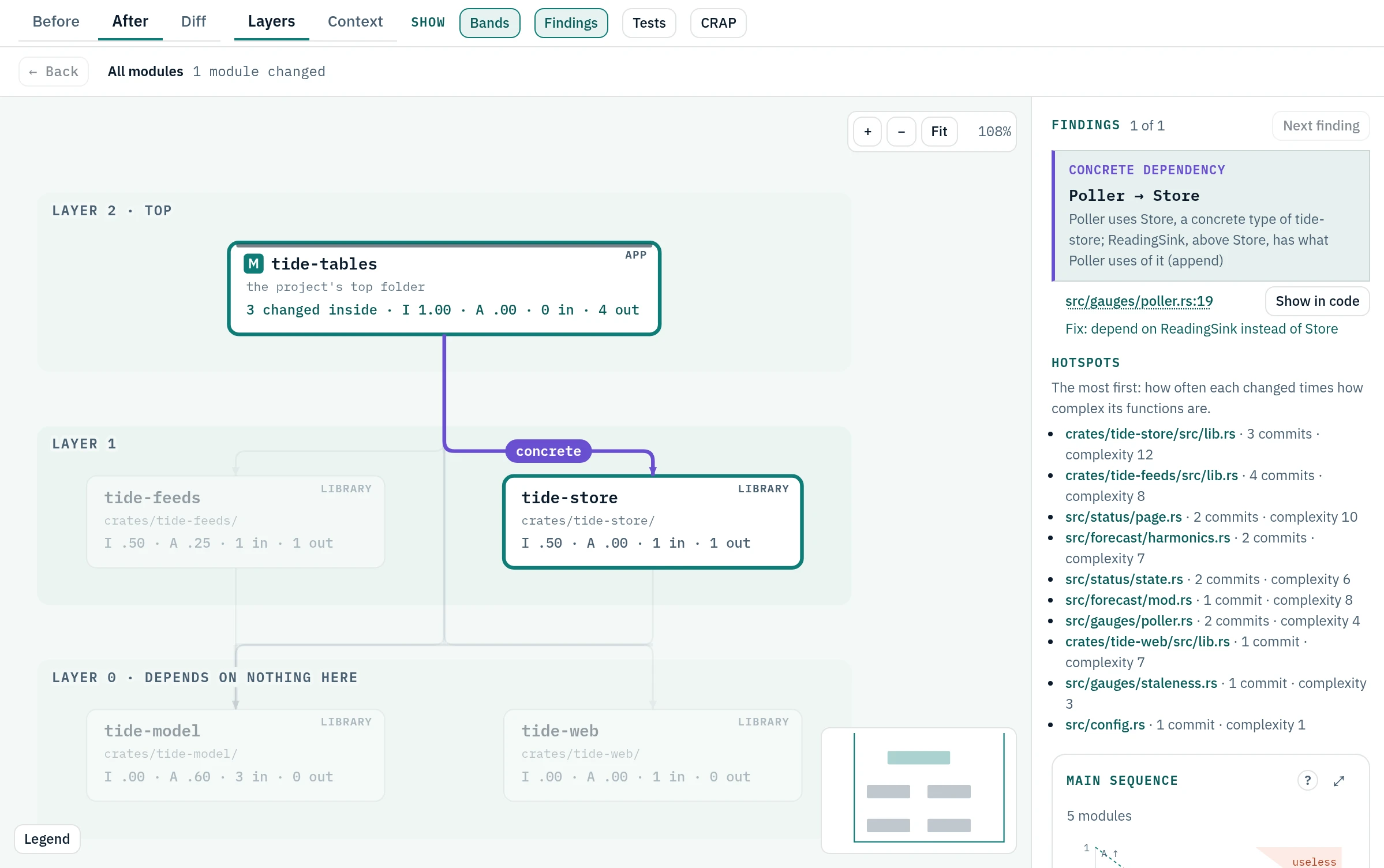
An agent changes twenty files before lunch. Wakemark draws what that does to your project's structure, beside the diff.
- Modules, folders, files and types, read from your build files without building: Rust, C and C++, Go, Python, Java and Kotlin, C#, JavaScript and TypeScript.
- Before, After and Diff. The project as it was, as the change leaves it, or the change alone.
- Findings with their fix. Cycles, dependencies on less stable modules, and a concrete class kept where an interface would do, with the interface to use.
- CRAP from your own tests. Each function's complexity weighed against your coverage report, and the files that change most and are most complex.
- Agents see it too. Their architecture tool and your policy catch a new cycle before anyone reviews it.
Merge gates
Ready means what your team says it means.
A small file on main sets the rules: how many approvals, whether comments must be resolved, which checks run and when, and how the work lands. The stream's agent runs the checks against whatever CI you have.
- The copy on main counts, so a branch can't loosen the rules for itself.
- Each check when it makes sense. On every commit under review, once the reviewers have approved, or only when someone presses Run now. after waits for another check to pass first, and a check that isn't required is shown without blocking.
- Your script looks, the agent judges. With poll, Wakemark runs your own script each time it looks again, so an hour-long build costs no agent time. The agent steps in when the script can't tell, or to fix a failure.
- Fixes and landing, your way. fix lets the agent push a small fix, which reviewers approve again. The work lands straight on main, through a merge queue, or by your own landing skill.
- Don't want to write it? Ask the agent to "set up the review policy for this project". It asks what it can't work out, then writes the file.
[review]
approvals = 1
resolved_comments = true

[[check]]
name = "build"
skill = "ci-build"              # your CI, taught once
poll = "ci/verdict.sh"          # looks again without the agent

[[check]]
name = "full-build"
skill = "ci-build"
instructions = "Every platform."
run = "approved"                # once the review gates pass
after = "build"                 # and the quick build is green
fix = true                      # may push a small fix

[[check]]
name = "licences"
instructions = "No new GPL dependencies."
run = "manual"                  # when someone presses Run now
required = false                # shown, never blocks

[land]
skill = "team-release"          # or [queue] for a merge queue
Merge queue
Land what was built. No merge request.
Approved streams queue for main. Each one is rebased onto the one ahead of it and built at the same time. Main fast-forwards to the first green candidate, so what lands is exactly the commit that was built.
- Works with any git server, including the ones that have no merge trains.
- A failure only takes out its own stream. It goes back with the build's report, and the streams behind it rebuild without it.
- Every step is in the stream: queued, built, landed, or why it left.
- Or keep your pull requests. A landing skill has the agent open the pull request, wait for its reviews and build, and merge it.
- 1fix/upload-retry candidate 3e1d0a4 on main✓ full-build
- 2feat/export-csv candidate 9b27c55 on 3e1d0a4◷ full-build
- 3docs/policy-examples candidate 41f0e2b on 9b27c55◷ full-build
Rewrites
Squash without amnesia.
Amend, rebase, squash, fixup. Wakemark follows each commit through every rewrite. A squashed commit carries the work of every commit in it, in commit order, even when the squashed commits were themselves squashes.
Self-hosted
Your code never leaves the harbor.
Wakemark runs on your own server, next to your own git. The only traffic that leaves your network is what your agent sends to the model you chose, on your own account.
Your server
One container and Postgres, inside your VPN. People sign up with an invite code.
Works without the server
Sign in and keep working on a train with no VPN; the app syncs when it can reach the server again. Your agent still needs its model provider.
Secrets stay off the server
Before anything syncs, parts that look like a token, key or password are kept on the machine that wrote them.
Private until landed
A stream is visible to its author and the reviewers they invite. Once it lands, the team can read why.
Compared
What a pull request can't hold.
| Pull request + chat logs | Wakemark | |
|---|---|---|
| What reviewers see | The diff and a description written afterwards | The diff next to every prompt, agent turn, command and correction |
| Asking why | Ping the author and hope they remember | Ask the stream's agent; it answers from the record |
| After a squash | The link to any notes is gone | Every squashed commit's history, in commit order |
| Months later | A new chat that knows nothing | Wake the stream; the agent has the whole history |
| Rules for ready | Forge settings or CI glue | A policy.toml on main with checks in plain words |
| Landing | A merge button, or a queue if your forge has one | A stacked queue that lands exactly the commit that was built |
| Where it lives | Wherever each tool keeps its data | Your machines and your server |
On the chart
Where we're heading next.
Co-driving
Hand a stream to a teammate and take turns with its agent. Their turns merge through the agent first, and people see only what it can't settle.
A runner machine
Today a reviewer's computer moves the queue on when the author is away. A runner will do it with nobody's app open.
Single sign-on
Sign in to the team server with your company's identity provider, through OIDC.
Questions
Before you drop anchor.
Which coding agents does it work with?
Claude, Codex and Gemini are built in, and any other agent that speaks the open Agent Client Protocol (ACP) can be added: about 40 from the ACP Registry, such as GitHub Copilot, Cursor, goose and OpenCode, or your own, such as a local model tool's adapter. Each stream picks its agent, signed in with your own account or API key; Wakemark never handles your AI credentials.
Does it replace GitLab, GitHub or Gitea?
No. Your repositories stay where they are, and you commit, push and pull as usual. Wakemark adds the record, the review and the merge queue on top, and links commits to streams by watching the checkout.
What leaves our network?
Only the calls your agent makes to its model provider. Streams, code, comments and reviews stay on your machines and your team server. Parts of a stream that look like secrets, such as tokens and keys, are kept on the machine that wrote them. The agent's model provider sees whatever the agent reads.
Do we have to leave our editors?
No. JetBrains IDEs, Zed, Neovim, Emacs, Xcode, Qt Creator, VS Code with an ACP extension, and other editors that run agents through ACP can run them through Wakemark. The work lands in the same streams, and the agent there has Wakemark's tools: its review, the other streams, and why code reads as it does.
Do submodules work?
Yes. A diff shows each submodule's changes with its branch and commits, one commit and push covers the top level and its submodules, and they land together with the stream.
Linux and Windows?
The desktop app is built for both. Reviewers who don't run it can follow streams live in a browser, served by the team server.
Our CI is unusual. Can checks still work?
A check is a job described in plain words or in a skill file in your repo, such as "find the build of this commit and tell me whether it is green". If your agent can reach the build system, it can run the check.
Is it free?
For small teams, yes: every feature, free for up to 10 active users per organization. People who only read or follow streams don't count. Larger teams buy Wakemark Business, at €20 per active user a month, billed yearly. It adds support and the source code, and the releases from the years you paid for keep working if you stop. Licence and prices
Who can read a stream?
While the work is on its branch, only the author and the reviewers they invite. Once it lands on main, the whole team can, so anyone can find out why a line of code exists.
Get started
Keep the wake.
One app for each person, and when the team joins, one server for all of you. Your git server stays as it is.
Start the team server
tar xzf wakemark-server.tar.gz && cd wakemark-server
docker load -i wakemark-server-image.tar
cp env.example .env   # invite code, database password
docker compose up -d
Create the admin account
Open
http://<server>:8740. The first account is the admin. Share the invite code with your team.Install the app and open a checkout
Download it here or from your server's page, sign in, pick a folder with a git clone, and start a stream.